VKC Item Area Collider
VKC Item Area Collider is a component for introducing actions to objects.
It executes the specified actions when a player enters the collider.
For actions, see Actions Overview.
Configuration Settings
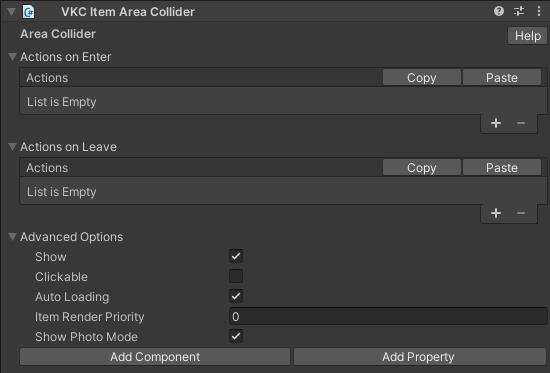
In each of Actions on Enter and Actions on Leave, you can set any action by clicking Add(+).
You can remove the last action by clicking Delete(-).
| Label | Function |
|---|---|
| Actions on Enter | Set the action when entering the area. |
| Actions on Leave | Sets the action when leaving the area. |
For actions, see Actions Overview.
For colliders, see Unity Production Guidelines - Colliders.
Available methods for this object type
Advanced Options
| Label | Default | Function |
|---|---|---|
| Show | True | This option does not work with the VKC Item Area Collider. |
| Clickable | False | This option does not work with the VKC Item Area Collider. |
| Auto Loading | True | Toggles dynamic loading on/off. |
| Item Render Priority | 0 | Allows changing the rendering priority of the item in the world. |
| Show Photo Mode | True | This option does not work with the VKC Item Area Collider. |
Usage Notes
There are several important considerations when using the VKC Item Area Collider:
Place the collider lower than the player's feet
The collision detection for area colliders is located at "the player's feet".
If collision detection is not working, check if the collider is floating above the ground.
In the figure, the collider on the left does not detect collisions because it is floating above the ground. The position needs to be lowered so that it contacts the ground like the collider on the right.

Place as a child of an object with VKC Item Field component
Objects with the VKC Item Area Collider component must be placed under another object that has the VKC Item Field component.
If collision detection is not working, check the parent-child relationship in the Unity hierarchy.
As shown in the figure, move the object under the "World" object that has the ItemField component.

Reason for placing under a VKC Item Field object
VKC Item Field is used to output collider shapes and other forms. Conversely, an Area Collider alone cannot include the collider shape in the build.